Your Personal Ergonomic Assistant
MacBreakZ is a sophisticated Personal Ergonomic Assistant designed to promote healthy and productive computer use.
About Microbreaks
Repetitive Strain Injury (or cumulative trauma disorder) is still a fairly young area of medical investigation and there is the usual degree of contradictory evidence and opinion.
One notion that enjoys pretty universal acceptance is that a major cause for RSI are long uninterrupted spells of input device usage.
In other words, typing for 10 minutes without interruption puts you at much higher risk of contracting an RSI injury than typing 10 times for one minute without interruption. In fact much research suggests that the latter is many times safer than the former.
This has lead researchers to investigate the notion of microbreaks (also knows as micro pauses). These are very short breaks of no more than a few seconds that are designed to break up longer spells of typing (or indeed "mousing") into much safer shorter "chunks".
While the results on this research are (unsurprisingly perhaps) not yet generally accepted medical advice, there is a growing body of evidence supporting the conclusion that microbreaks (very) significantly reduce your risk of contracting RSI by providing your body with frequent recovery opportunities.
MacBreakZ's activity level monitoring and the instant feedback provided by the activity window and/or menu bar item allow you to see what your current activity level is and encourages you to stay within the "safe" level.
This approach of managing your microbreaks yourself by suspending your activity for a few seconds when you see that you are in the "red" or "yellow" zones and waiting for your activity level to drop back into the green zone, has much to recommend itself.
Mostly it avoids MacBreakZ from interrupting you in the middle of your work with constant microbreak reminders by putting you in charge.
The problem with managing your microbreaks in this manner is that you are likely to forget taking them regularly. You can thus configure MacBreakZ to prompt you more explicitly to take a microbreak.
How to configure microbreaks
You can activate explicit microbreak prompting in the "Microbreaks" section of the Preferences.. dialog.
How to take a microbreak
If you have chosen to be prompted to take microbreaks, you will be presented with the following prompt once you have reached the highest "danger" activity level:
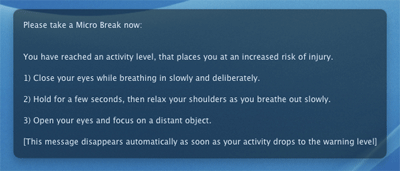
Depending on your settings, the prompt will disappear whether you follow the instructions or not.
If you have chosen to end the microbreak only once the "safe" or the "warning" activity level have been reached, the prompt will stay up until you have being inactive (i.e. haven't used the keyboard or mouse) for long enough for your activity level to have dropped.